> ## Documentation Index
> Fetch the complete documentation index at: https://wiki.worldrepublic.org/llms.txt
> Use this file to discover all available pages before exploring further.
# Get verified
> Confirm your eligibility to vote in World Republic elections.
Follow these steps to verify that you are a real, unique human. This one-time process allows you to vote in all future World Republic elections.
**Privacy first:** Verification uses the [Self Protocol](https://self.xyz),
which uses zero-knowledge proofs to confirm you're a real person without
exposing any of your personal data.
This guide uses the recommended NFC flow for portability across verification
providers; Self may also support additional credential types.
## Prerequisites
* A smartphone with NFC capability
* A supported government document:
* EU identity card
* Indian Aadhaar
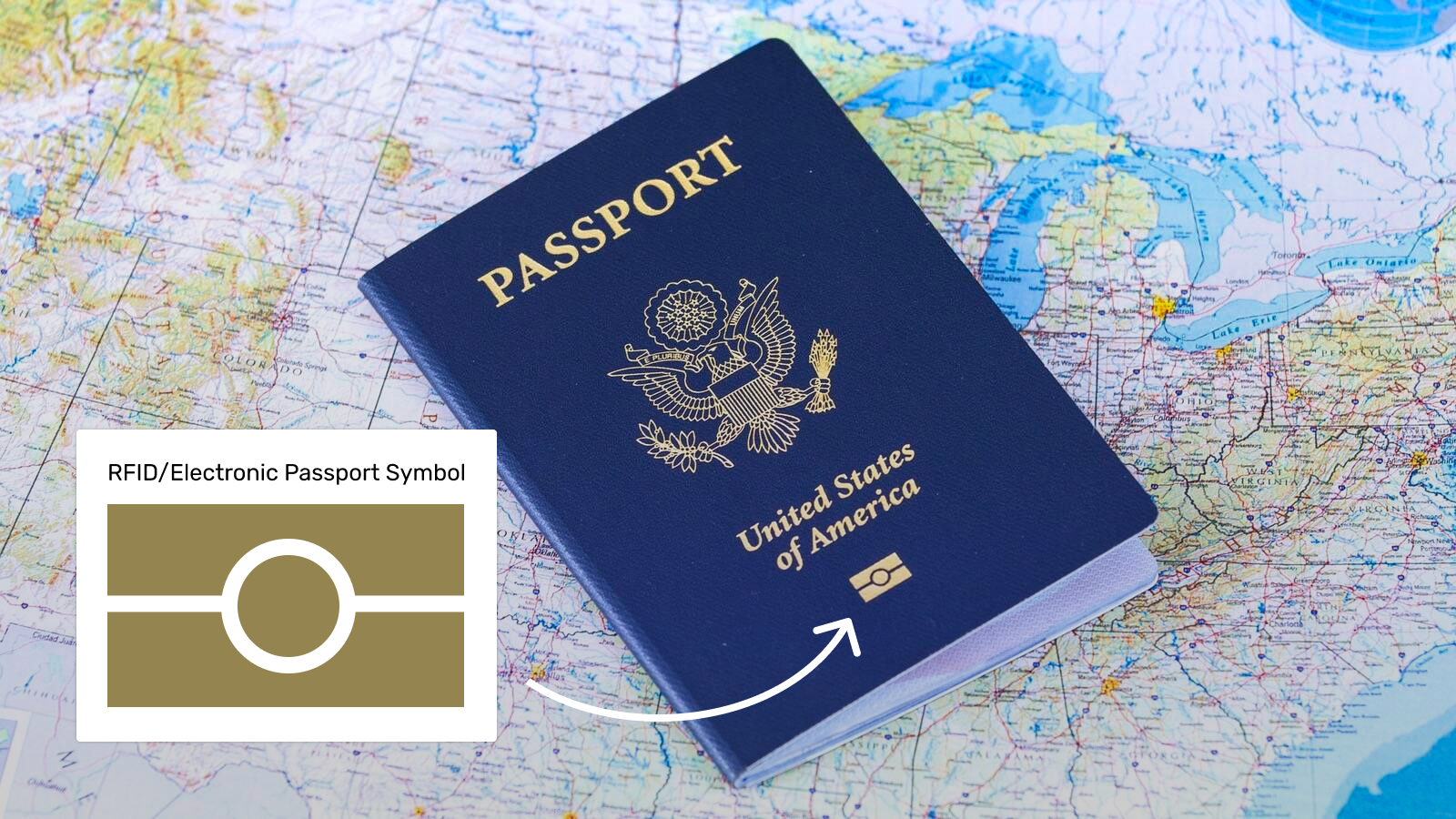
* Passport (NFC-enabled)
 Check if your country's passports are supported on the [Self Protocol
Coverage Map](https://map.self.xyz/).
## Steps
Install the Self app on your mobile device.
Download for iOS
Download for Android
Tap the **plus icon** in the navigation bar to begin.
Check if your country's passports are supported on the [Self Protocol
Coverage Map](https://map.self.xyz/).
## Steps
Install the Self app on your mobile device.
Download for iOS
Download for Android
Tap the **plus icon** in the navigation bar to begin.
 Select your country and ID type, then follow the on-screen instructions to
scan your document.
Make sure your phone case is removed if you have trouble scanning. The NFC
chip is usually located on the back cover or the photo page of passports.
Once scanned, the app will generate your unique "Self ID" using a zero-knowledge proof. This process happens entirely on your device.
## Outcome
You now have a verified digital ID stored securely on your phone. You do not need to "upload" anything to the World Republic app—you will simply use your Self app to approve your vote when you cast it.
**Success!** You are now ready to vote.
## Troubleshooting
1. Ensure your phone has NFC enabled in settings.
2. Remove any thick phone cases.
3. Try sliding the phone slowly over the document to find the chip location.
4. Ensure your passport has the "chip" symbol on the front cover.
Yes. World Republic never sees your personal data. The Self app generates a mathematical proof (ZKP) on your device that only says "this is a unique human," without revealing *who* you are.
**Need help?** Reach out to [Self Protocol
Support](https://discord.gg/selfxyz) on Discord if you encounter issues with
the app.
## Next steps
Use your new verified ID to participate in an election
Select your country and ID type, then follow the on-screen instructions to
scan your document.
Make sure your phone case is removed if you have trouble scanning. The NFC
chip is usually located on the back cover or the photo page of passports.
Once scanned, the app will generate your unique "Self ID" using a zero-knowledge proof. This process happens entirely on your device.
## Outcome
You now have a verified digital ID stored securely on your phone. You do not need to "upload" anything to the World Republic app—you will simply use your Self app to approve your vote when you cast it.
**Success!** You are now ready to vote.
## Troubleshooting
1. Ensure your phone has NFC enabled in settings.
2. Remove any thick phone cases.
3. Try sliding the phone slowly over the document to find the chip location.
4. Ensure your passport has the "chip" symbol on the front cover.
Yes. World Republic never sees your personal data. The Self app generates a mathematical proof (ZKP) on your device that only says "this is a unique human," without revealing *who* you are.
**Need help?** Reach out to [Self Protocol
Support](https://discord.gg/selfxyz) on Discord if you encounter issues with
the app.
## Next steps
Use your new verified ID to participate in an election